
SLA policies and business hours
Menu: SOC Management → SLA policies Best for: Admin (analysts can read, only admins can change) An SLA policy is the promise the SOC makes: for each severity of alert and case, how soon it will be acknowledged (respond within) and resolved (resolve within). SOC Management measures every item against it.Where targets come from
Each cell (entity × severity) resolves to the first of:- the customer’s override, if the customer has one for that cell;
- the global policy, if it sets that cell;
- the built-in default.
Leaving a target empty means no promise for that clock: those items are not counted in compliance at all, rather than counted as met.
A case’s severity is the one set on the case, or — when none is set — the most severe of its linked alerts.
Editing a policy
- Pick the scope on the left: Global policy, or a customer (customers with overrides are marked).
- For each cell, switch it to Custom / Override to give it its own targets; switched off, it follows the next scope out and shows the value it inherits.
- Enter Respond within and Resolve within in minutes, hours or days.
- Choose Counted in: 24/7 or Business hours (see below).
- Save.
What happens to items already open
Each item keeps the targets it opened with — a policy change is a promise about new work. Turn on Apply to items still open when saving to re-time the open ones too. Even then, a clock that is already met or breached never changes: an acknowledgement that was on time stays on time.Business hours
A cell counted in business hours only spends working time. 4 business hours for an alert opened on Friday at 16:00 runs one hour on Friday and three on Monday morning; a weekend or a holiday never breaches it.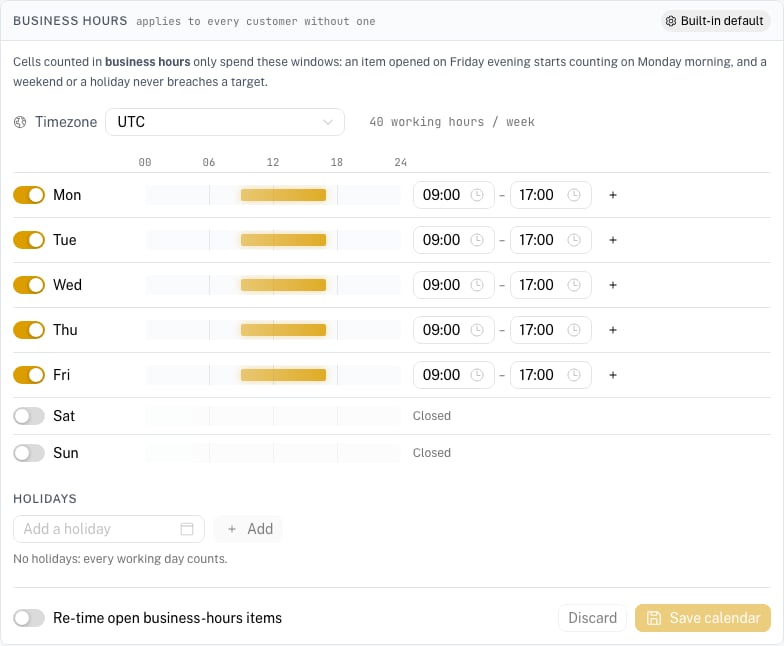
- Timezone — the calendar’s own (e.g.
Europe/Rome). Working windows are local time, and daylight-saving changes are handled. - Working week — each day open or closed, with one or more windows (a lunch break is two windows). The strip shows the day at a glance.
- Holidays — closed days on top of the week.
- the customer’s calendar, if it has one;
- otherwise the global calendar;
- otherwise the built-in default, Monday–Friday 09:00–17:00 UTC — set the real one before relying on business hours.
Waiting on the customer
Setting an alert or case to Waiting on customer stops both its clocks; the time spent waiting is added back to its due times and left out of its time to resolve. On a business-hours cell the wait is measured in working time too, so a weekend spent waiting extends a business-hours target by nothing. The customer’s reply in the portal hands the item back to the SOC (In progress) and restarts the clocks. A case set to waiting takes its open alerts with it, and brings them back when it resumes.Related pages
- SOC Management: ./soc-management.md
- Notifications (SLA at risk / breached): ./notifications.md
- Customer Portal — Service Levels: ./customer-portal-service-levels.md