> ## Documentation Index
> Fetch the complete documentation index at: https://docs.socfortress.co/llms.txt
> Use this file to discover all available pages before exploring further.
# Artifacts (Velociraptor)
> Run Velociraptor artifacts from CoPilot to collect DFIR evidence from endpoints and review results.
# Artifacts (Velociraptor)
**Menu:** Artifacts
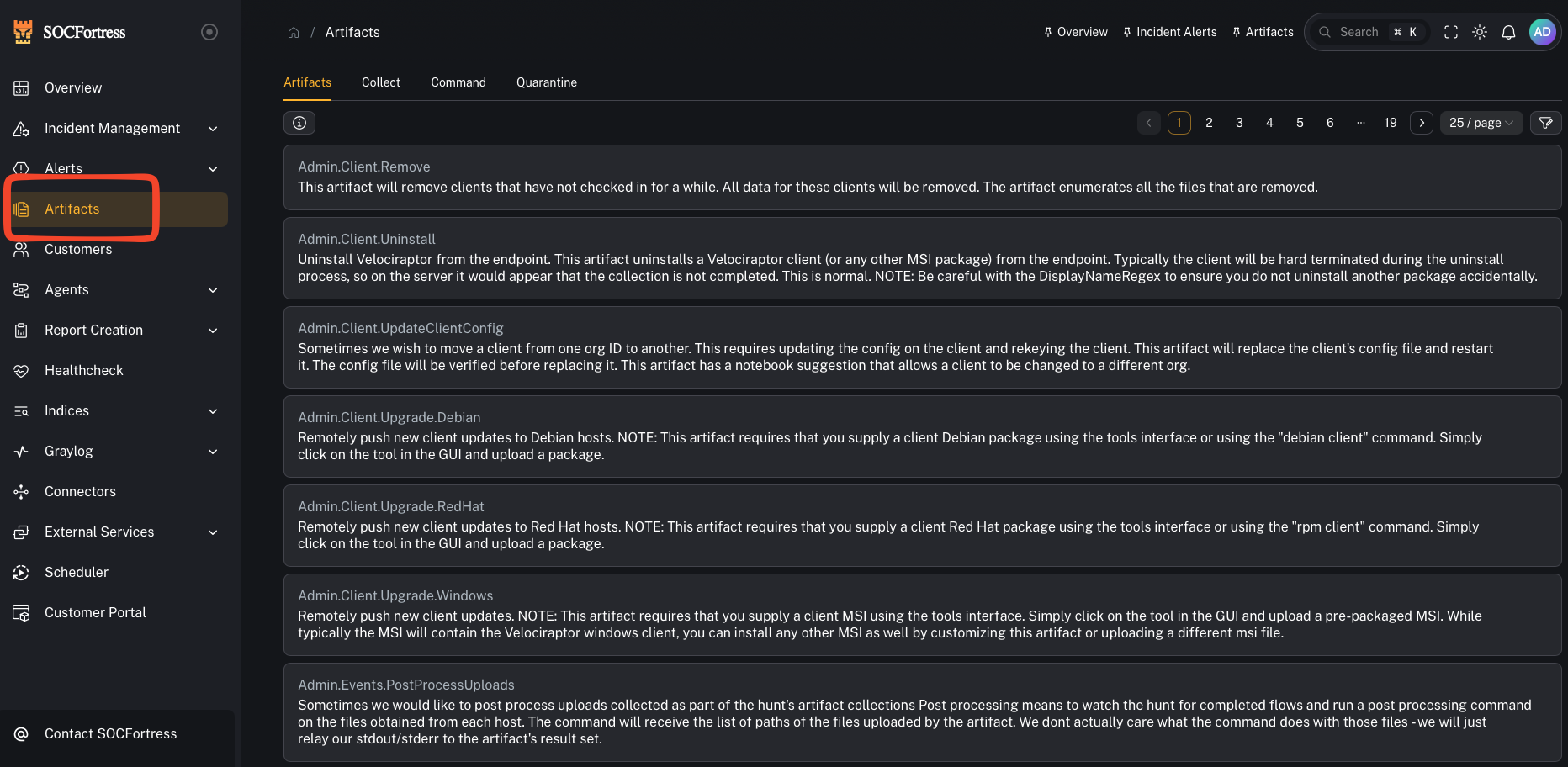
CoPilot’s Artifacts feature integrates with **Velociraptor** (DFIR / threat hunting) to run **Velociraptor Artifacts** via the Velociraptor API and pull results back into CoPilot.
 ***
## What is Velociraptor?
Velociraptor is an advanced **digital forensics and incident response (DFIR)** platform that gives you endpoint visibility and targeted evidence collection at scale.
A few key concepts (Velociraptor terminology):
* **VQL**: Velociraptor Query Language (how evidence is collected)
* **Artifacts**: packaged collections (YAML) of one or more VQL queries + parameters + preconditions
Velociraptor artifacts are designed to be reusable and safe to run across fleets using **preconditions** (if a precondition fails, that source is skipped).
Reference:
* Velociraptor docs: [https://docs.velociraptor.app](https://docs.velociraptor.app)
* Artifacts concept: [https://docs.velociraptor.app/docs/vql/artifacts/](https://docs.velociraptor.app/docs/vql/artifacts/)
***
## What you can do in CoPilot
From an operator perspective, CoPilot lets you:
* **Select an endpoint** (agent/hostname / Velociraptor ID)
* **Choose an artifact** to run (collection)
* **Provide parameters** (when the artifact requires them)
* **Run the artifact** and review the returned results
***
## Before you start (required identifiers)
CoPilot needs a way to target the correct Velociraptor client.
In the UI you’ll typically see fields like:
* **Hostname** (optional)
* **Velociraptor ID** (the Velociraptor client id)
If the endpoint doesn’t have a valid Velociraptor ID mapped, collections won’t run against that host.
***
## Step 1 — Run an artifact collection
***
## What is Velociraptor?
Velociraptor is an advanced **digital forensics and incident response (DFIR)** platform that gives you endpoint visibility and targeted evidence collection at scale.
A few key concepts (Velociraptor terminology):
* **VQL**: Velociraptor Query Language (how evidence is collected)
* **Artifacts**: packaged collections (YAML) of one or more VQL queries + parameters + preconditions
Velociraptor artifacts are designed to be reusable and safe to run across fleets using **preconditions** (if a precondition fails, that source is skipped).
Reference:
* Velociraptor docs: [https://docs.velociraptor.app](https://docs.velociraptor.app)
* Artifacts concept: [https://docs.velociraptor.app/docs/vql/artifacts/](https://docs.velociraptor.app/docs/vql/artifacts/)
***
## What you can do in CoPilot
From an operator perspective, CoPilot lets you:
* **Select an endpoint** (agent/hostname / Velociraptor ID)
* **Choose an artifact** to run (collection)
* **Provide parameters** (when the artifact requires them)
* **Run the artifact** and review the returned results
***
## Before you start (required identifiers)
CoPilot needs a way to target the correct Velociraptor client.
In the UI you’ll typically see fields like:
* **Hostname** (optional)
* **Velociraptor ID** (the Velociraptor client id)
If the endpoint doesn’t have a valid Velociraptor ID mapped, collections won’t run against that host.
***
## Step 1 — Run an artifact collection
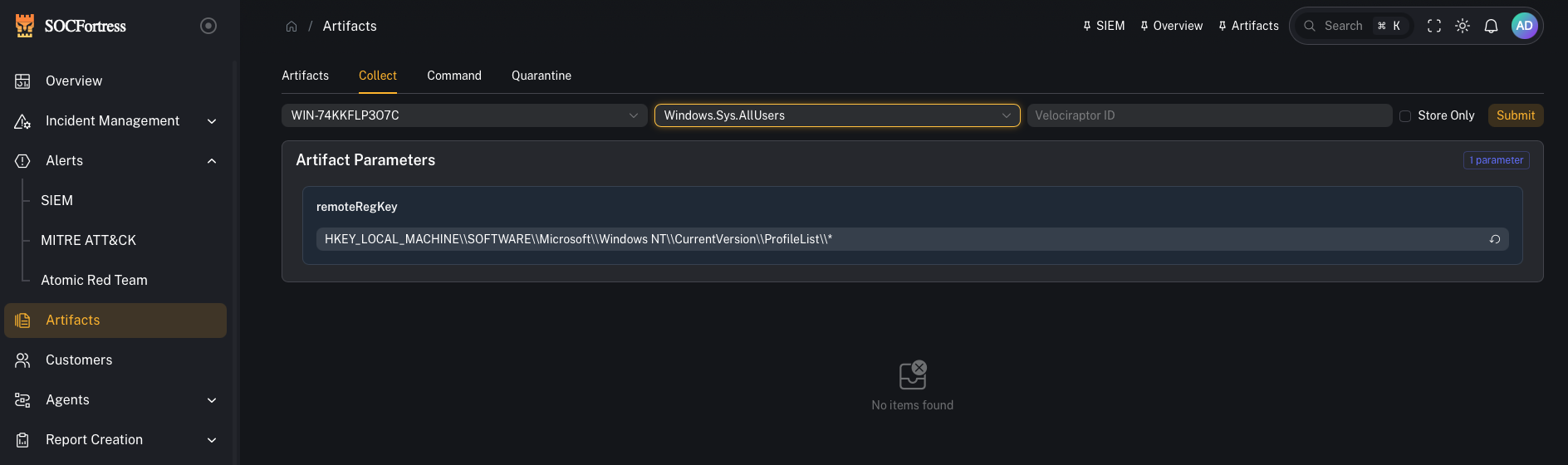 1. Open **Artifacts**
2. Select (or enter) the target endpoint (Hostname / **Velociraptor ID**)
3. Choose the artifact you want to run
4. Fill in any required parameters
5. Start the collection
Operator tips:
* Prefer artifacts that are **targeted** (high-signal) rather than “collect everything.”
* If an artifact supports parameters (time range, path, user, regex), start narrow.
***
## Step 2 — Review results
1. Open **Artifacts**
2. Select (or enter) the target endpoint (Hostname / **Velociraptor ID**)
3. Choose the artifact you want to run
4. Fill in any required parameters
5. Start the collection
Operator tips:
* Prefer artifacts that are **targeted** (high-signal) rather than “collect everything.”
* If an artifact supports parameters (time range, path, user, regex), start narrow.
***
## Step 2 — Review results
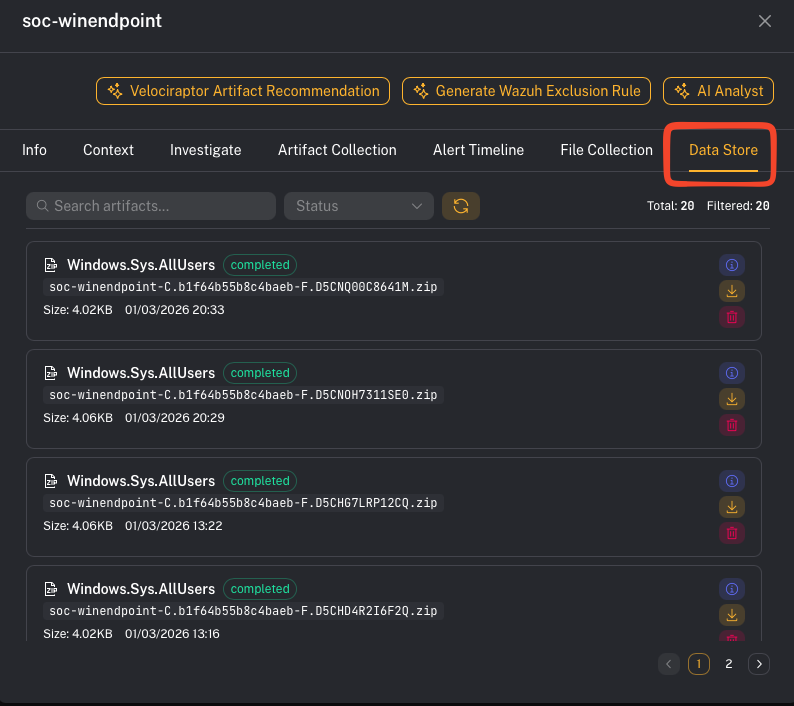 After the artifact finishes, review:
* returned rows/tables (the “answers” from VQL)
* any files collected (if the artifact uploads files)
* errors or skipped preconditions (common when an artifact is OS-specific)
What good looks like:
* You can answer: *what evidence did we collect, from which host, and what does it mean for the alert/case?*
***
## Step 3 — Use artifacts from an alert (fast triage)
CoPilot also surfaces artifact collection entry points from **Alerts → Assets**.
Practical workflow:
1. Open an alert
2. Go to the impacted asset
3. Run a targeted artifact (process listing, persistence checks, event logs, etc.)
4. Bring the result back into the case via notes/comments
***
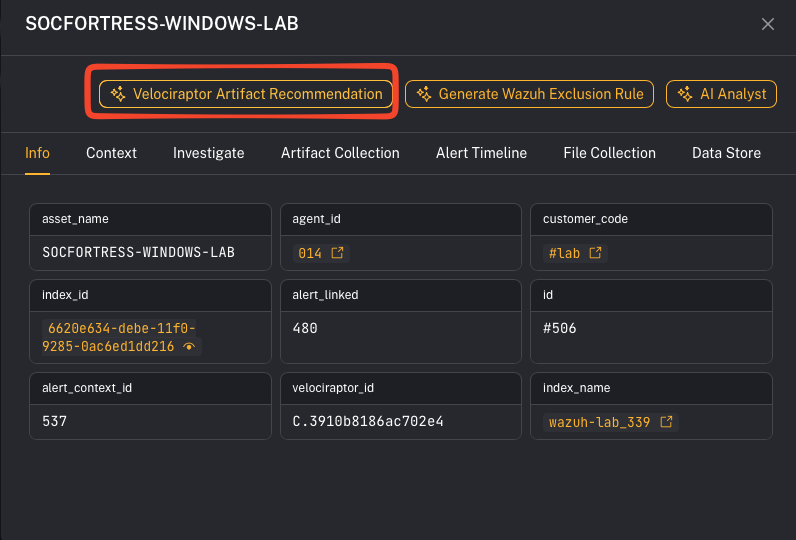
## Step 4 — (Optional) Artifact recommendations
Some CoPilot views may provide artifact recommendations to speed up response.
After the artifact finishes, review:
* returned rows/tables (the “answers” from VQL)
* any files collected (if the artifact uploads files)
* errors or skipped preconditions (common when an artifact is OS-specific)
What good looks like:
* You can answer: *what evidence did we collect, from which host, and what does it mean for the alert/case?*
***
## Step 3 — Use artifacts from an alert (fast triage)
CoPilot also surfaces artifact collection entry points from **Alerts → Assets**.
Practical workflow:
1. Open an alert
2. Go to the impacted asset
3. Run a targeted artifact (process listing, persistence checks, event logs, etc.)
4. Bring the result back into the case via notes/comments
***
## Step 4 — (Optional) Artifact recommendations
Some CoPilot views may provide artifact recommendations to speed up response.
 ***
## Operator artifact starter pack (recommended)
Use this section as a default playbook when you’re in triage and need to move fast.
### 1) Identify the host (what system is this?)
Run:
* `Generic.Client.Info` (basic host facts)
* `Generic.Client.DiskSpace` (quick disk pressure check)
### 2) Process triage (what’s running right now?)
Run:
* Windows: `Windows.System.Pslist`
* Linux: `Linux.Sys.Pslist`
### 3) Network triage (is it talking to something?)
Run:
* Windows: `Windows.Network.Netstat`
* Linux: `Linux.Network.Netstat`
### 4) Persistence triage (will it come back?)
Run:
* `Windows.Sys.StartupItems`
### 5) Find a file fast (where is this binary/script across the host?)
Run:
* `Windows.Search.FileFinder`
### 6) Execution evidence (what ran recently?)
Run:
* `Windows.Forensics.Prefetch`
* `Windows.System.Amcache` (alternate view of execution evidence)
### 7) Log triage (high-signal Windows event hunting)
Run:
* `Windows.EventLogs.EvtxHunter`
### 8) YARA hunting (when you have an IOC or suspect binary)
Run:
* Windows: `Windows.Detection.Yara.Process` (fast, memory/process focused)
* Windows: `Windows.Detection.Yara.NTFS` (disk scan)
* Linux: `Linux.Detection.Yara.Process`
> Tip: Start with **Process**-scoped YARA first (fastest), then broaden to disk if needed.
***
## Common gotchas
### “The artifact didn’t run / no results returned”
Common causes:
* The endpoint doesn’t have a correct **Velociraptor ID** mapped.
* The artifact precondition skipped the collection (e.g., wrong OS).
* Velociraptor connectivity/API credentials are not configured correctly.
### “This collected too much data”
Use parameterized artifacts, tighten time windows, and prefer targeted artifacts. Velociraptor is designed to return high-value results rather than bulk collection.
***
## Operator artifact starter pack (recommended)
Use this section as a default playbook when you’re in triage and need to move fast.
### 1) Identify the host (what system is this?)
Run:
* `Generic.Client.Info` (basic host facts)
* `Generic.Client.DiskSpace` (quick disk pressure check)
### 2) Process triage (what’s running right now?)
Run:
* Windows: `Windows.System.Pslist`
* Linux: `Linux.Sys.Pslist`
### 3) Network triage (is it talking to something?)
Run:
* Windows: `Windows.Network.Netstat`
* Linux: `Linux.Network.Netstat`
### 4) Persistence triage (will it come back?)
Run:
* `Windows.Sys.StartupItems`
### 5) Find a file fast (where is this binary/script across the host?)
Run:
* `Windows.Search.FileFinder`
### 6) Execution evidence (what ran recently?)
Run:
* `Windows.Forensics.Prefetch`
* `Windows.System.Amcache` (alternate view of execution evidence)
### 7) Log triage (high-signal Windows event hunting)
Run:
* `Windows.EventLogs.EvtxHunter`
### 8) YARA hunting (when you have an IOC or suspect binary)
Run:
* Windows: `Windows.Detection.Yara.Process` (fast, memory/process focused)
* Windows: `Windows.Detection.Yara.NTFS` (disk scan)
* Linux: `Linux.Detection.Yara.Process`
> Tip: Start with **Process**-scoped YARA first (fastest), then broaden to disk if needed.
***
## Common gotchas
### “The artifact didn’t run / no results returned”
Common causes:
* The endpoint doesn’t have a correct **Velociraptor ID** mapped.
* The artifact precondition skipped the collection (e.g., wrong OS).
* Velociraptor connectivity/API credentials are not configured correctly.
### “This collected too much data”
Use parameterized artifacts, tighten time windows, and prefer targeted artifacts. Velociraptor is designed to return high-value results rather than bulk collection.