> ## Documentation Index
> Fetch the complete documentation index at: https://docs.socfortress.co/llms.txt
> Use this file to discover all available pages before exploring further.
# Vulnerability overview
> Review vulnerability posture across agents with EPSS scoring and package detail.
# Vulnerability overview
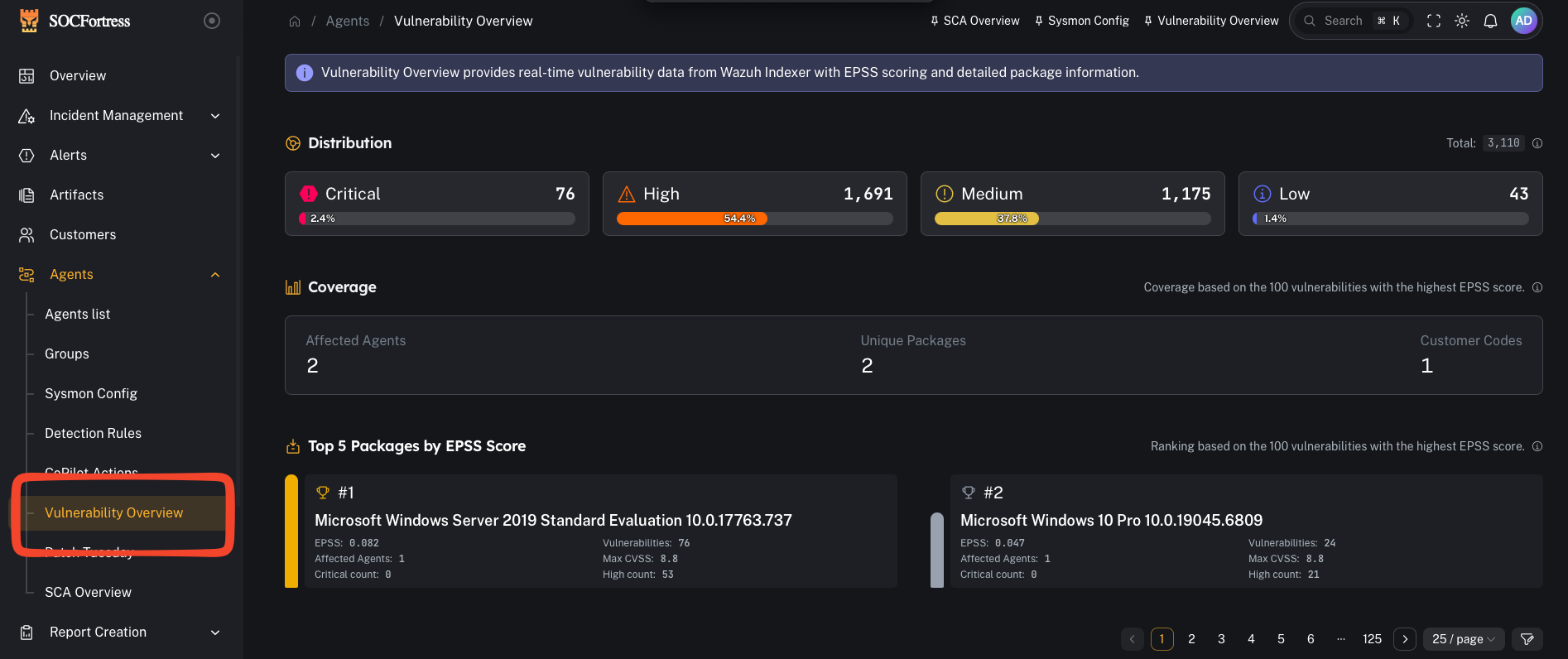
**Menu:** Agents → Vulnerability Overview
Vulnerability Overview provides near real-time vulnerability data (from **Wazuh Indexer**) enriched with **EPSS** scoring and package details, so you can prioritize remediation based on both severity and likely exploitation.
 ***
## What you’re looking at
### Distribution
***
## What you’re looking at
### Distribution
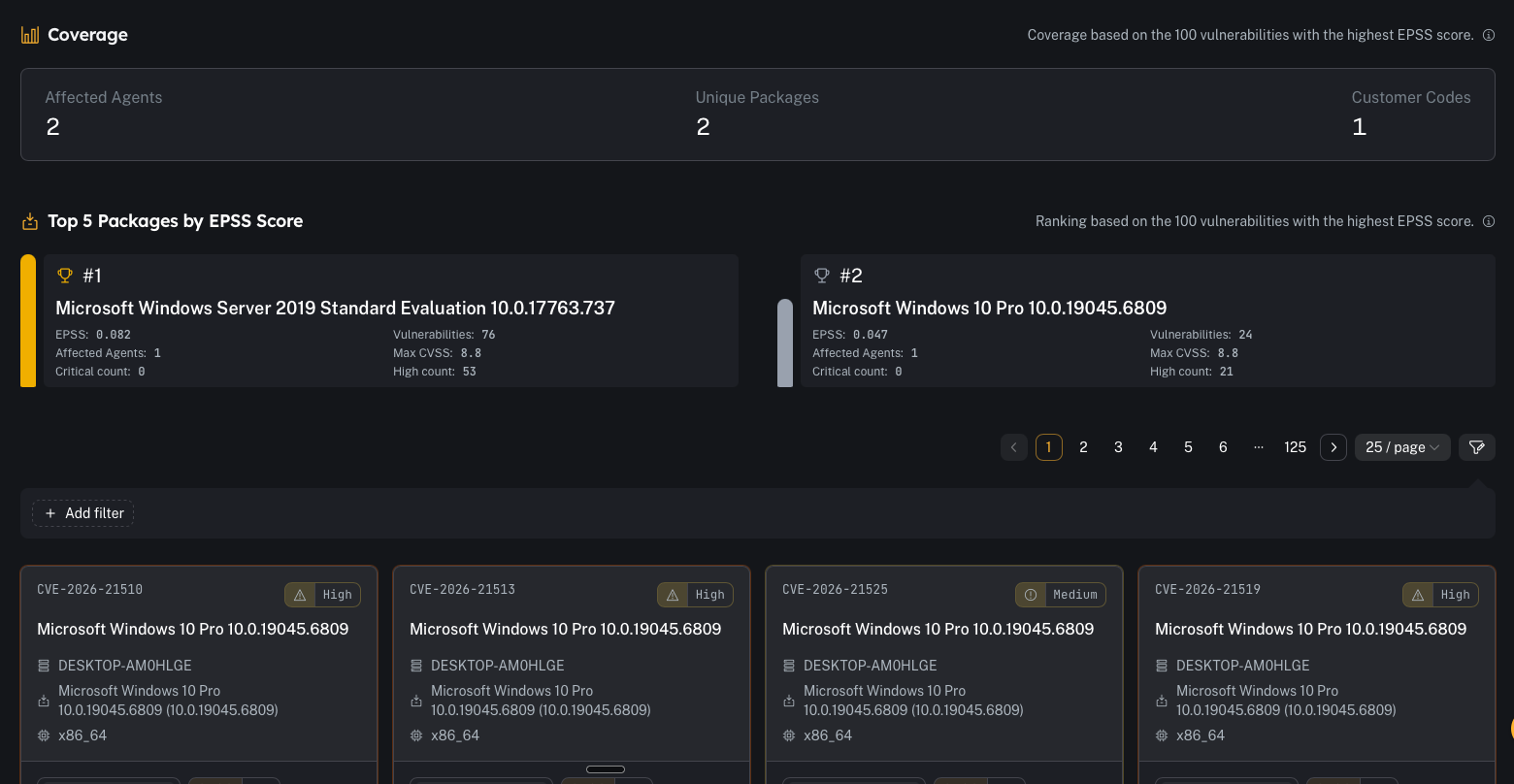 A quick breakdown of vulnerabilities by severity (Critical / High / Medium / Low).
Use this for:
* “How bad is it right now?”
* tracking whether patching is reducing overall exposure
### Coverage + top packages by EPSS
A quick breakdown of vulnerabilities by severity (Critical / High / Medium / Low).
Use this for:
* “How bad is it right now?”
* tracking whether patching is reducing overall exposure
### Coverage + top packages by EPSS
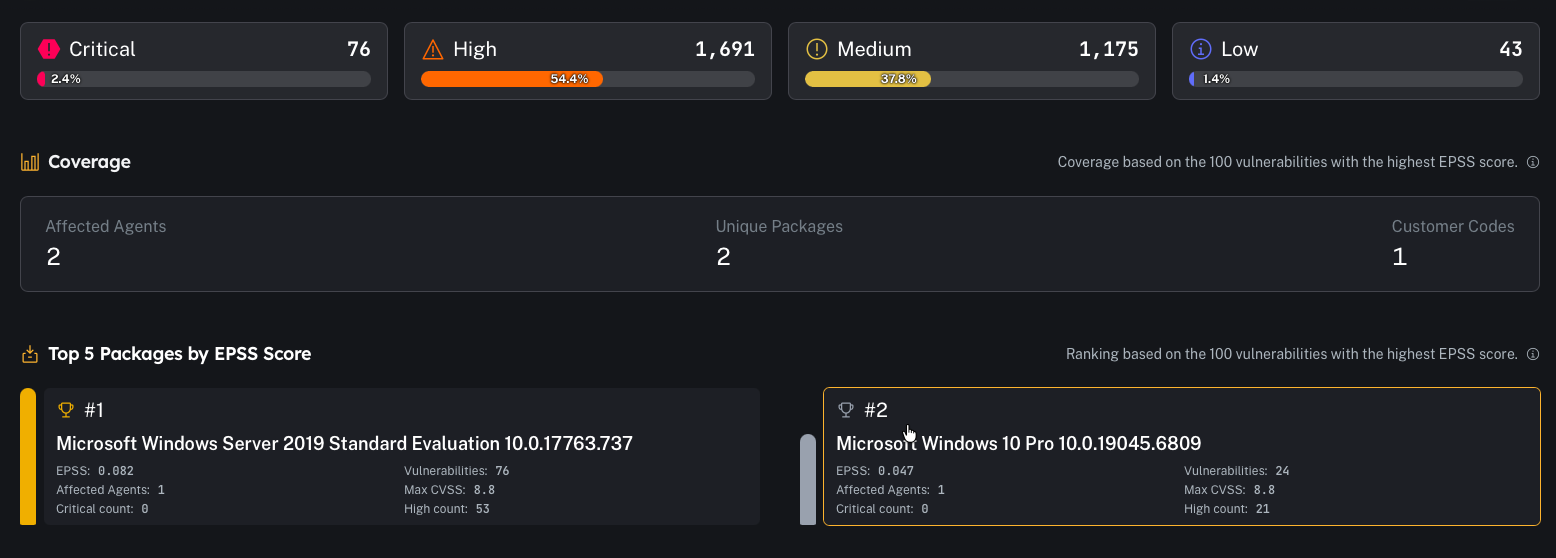 This section highlights:
* how many **agents** are impacted
* how many **unique packages** are involved
* how many **customer codes** are represented
And surfaces packages/vuln clusters ranked by **EPSS** (a good “what should we care about first?” view).
### Detailed table
This section highlights:
* how many **agents** are impacted
* how many **unique packages** are involved
* how many **customer codes** are represented
And surfaces packages/vuln clusters ranked by **EPSS** (a good “what should we care about first?” view).
### Detailed table
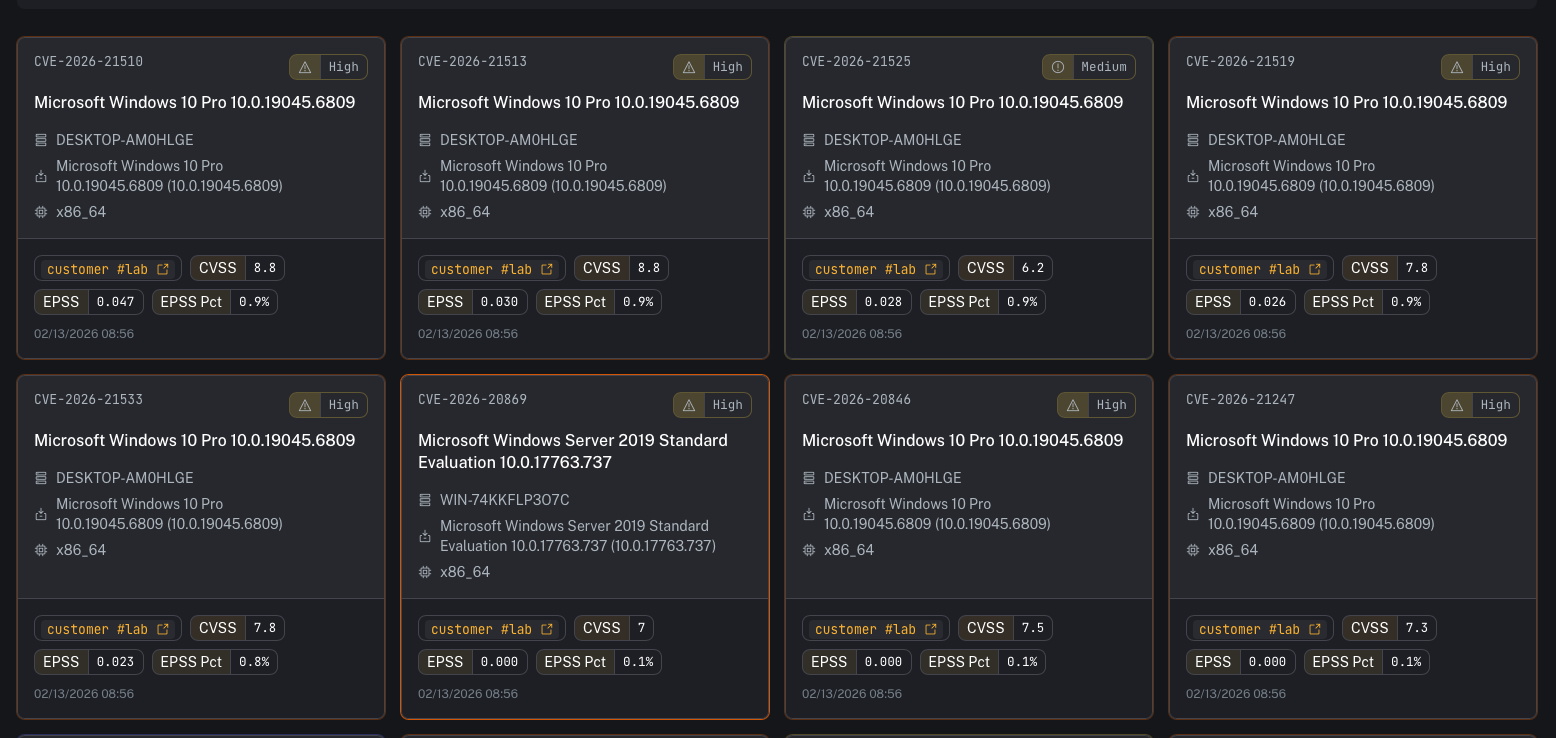 The table is the working view where you can pivot by:
* CVE
* severity
* affected agent/hostname
* package / OS / architecture
* **CVSS**
* **EPSS score** and **EPSS percentile**
* timestamp (when observed)
***
## EPSS (Exploit Prediction Scoring System) — how to use it
EPSS is a probability model maintained by FIRST that estimates the likelihood a CVE will be exploited “in the wild.”
In CoPilot you’ll typically see:
* **EPSS**: a score between **0 and 1** (higher means more likely exploitation)
* **EPSS Pct**: percentile ranking (how that CVE compares to other CVEs)
How to operationalize it:
* Use **CVSS** to understand *impact/severity*
* Use **EPSS** to understand *likelihood/urgency*
* Prioritize items that are **High CVSS + High EPSS** first
Rule of thumb:
* A Medium CVSS with a very high EPSS can be more urgent than a High CVSS with very low EPSS.
Reference:
* [https://www.first.org/epss/](https://www.first.org/epss/)
***
## Common tasks
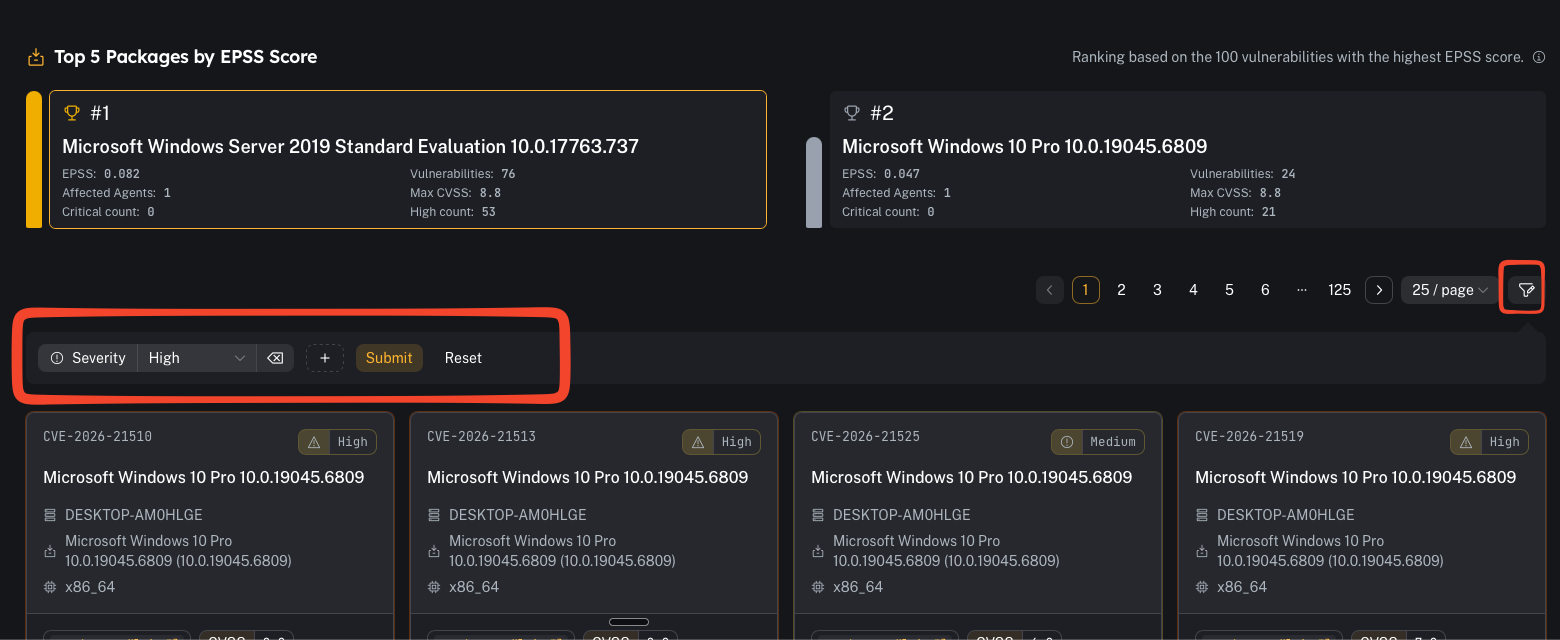
### Filter by tenant/customer
Use filters to focus on one customer code at a time in multi-tenant environments.
The table is the working view where you can pivot by:
* CVE
* severity
* affected agent/hostname
* package / OS / architecture
* **CVSS**
* **EPSS score** and **EPSS percentile**
* timestamp (when observed)
***
## EPSS (Exploit Prediction Scoring System) — how to use it
EPSS is a probability model maintained by FIRST that estimates the likelihood a CVE will be exploited “in the wild.”
In CoPilot you’ll typically see:
* **EPSS**: a score between **0 and 1** (higher means more likely exploitation)
* **EPSS Pct**: percentile ranking (how that CVE compares to other CVEs)
How to operationalize it:
* Use **CVSS** to understand *impact/severity*
* Use **EPSS** to understand *likelihood/urgency*
* Prioritize items that are **High CVSS + High EPSS** first
Rule of thumb:
* A Medium CVSS with a very high EPSS can be more urgent than a High CVSS with very low EPSS.
Reference:
* [https://www.first.org/epss/](https://www.first.org/epss/)
***
## Common tasks
### Filter by tenant/customer
Use filters to focus on one customer code at a time in multi-tenant environments.
 ### Identify “top risk” items
A practical triage flow:
1. Review **Top Packages by EPSS**
2. Open the package/CVE details
3. Identify affected agents
4. Create remediation tasks (patch/update/remove package)
5. Validate closure by confirming the item disappears as inventory updates
### Pivot to reporting
If you need a deliverable for a customer or internal patch window:
* use the reporting workflow described here: [Vulnerability report](/user/ui/report-vulnerability)
***
## Prerequisites
* Wazuh inventory (syscollector) is flowing for endpoints
* Wazuh vulnerability detection is enabled and indexing results
***
## Gotchas
* Stale inventory = stale posture. If an agent hasn’t checked in recently, its vulnerability list may be outdated.
* EPSS is a prioritization signal, not a guarantee—use it alongside your environment context (internet exposure, compensating controls, exploitability, asset criticality).
### Identify “top risk” items
A practical triage flow:
1. Review **Top Packages by EPSS**
2. Open the package/CVE details
3. Identify affected agents
4. Create remediation tasks (patch/update/remove package)
5. Validate closure by confirming the item disappears as inventory updates
### Pivot to reporting
If you need a deliverable for a customer or internal patch window:
* use the reporting workflow described here: [Vulnerability report](/user/ui/report-vulnerability)
***
## Prerequisites
* Wazuh inventory (syscollector) is flowing for endpoints
* Wazuh vulnerability detection is enabled and indexing results
***
## Gotchas
* Stale inventory = stale posture. If an agent hasn’t checked in recently, its vulnerability list may be outdated.
* EPSS is a prioritization signal, not a guarantee—use it alongside your environment context (internet exposure, compensating controls, exploitability, asset criticality).