> ## Documentation Index
> Fetch the complete documentation index at: https://docs.socfortress.co/llms.txt
> Use this file to discover all available pages before exploring further.
# CoPilot actions
> Run repeatable response actions across endpoints using CoPilot + Velociraptor, and visualize results in Grafana.
# CoPilot actions
**Menu:** Agents → CoPilot Actions
CoPilot Actions provides a more flexible way to launch endpoint actions (response + collection) across your infrastructure.
At a high level it combines:
* **CoPilot** (operator UI)
* **Velociraptor** (executes artifacts to run the action)
* **Custom scripts** (the action logic)
* **Grafana** (dashboards to visualize action results)
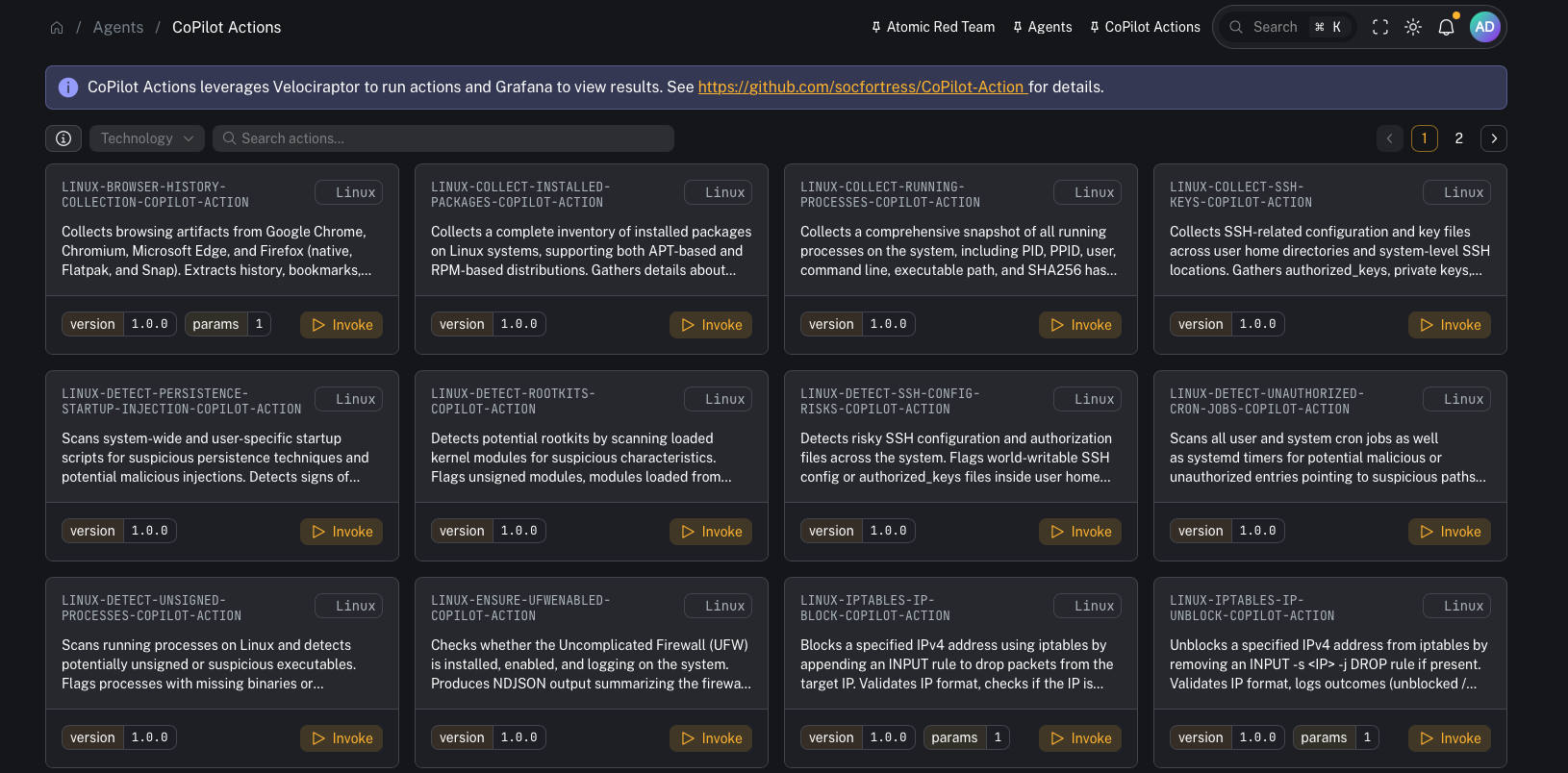 Repo (required for setup assets + implementation details):
* [https://github.com/socfortress/CoPilot-Action](https://github.com/socfortress/CoPilot-Action)
***
## Why this exists (vs “traditional Wazuh Active Response”)
Wazuh Active Response is powerful, but at scale it can become cumbersome to:
* deploy scripts to endpoints
* keep action logic consistent across OSes
* manage parameters and rollouts cleanly
CoPilot Actions is designed to make automated responses **simpler to run and easier to operationalize**.
***
## How it works
Conceptually:
1. You choose an action in CoPilot
2. CoPilot invokes a **Velociraptor artifact** (Windows or Linux)
3. The artifact downloads/executes the **action script** for the selected action
4. Results are written to logs and ingested into the stack
5. Grafana dashboards let you explore outcomes over time
CoPilot’s own UI also shows:
* supported OS/technology
* action metadata + description
* a link to the underlying source code repo for the action
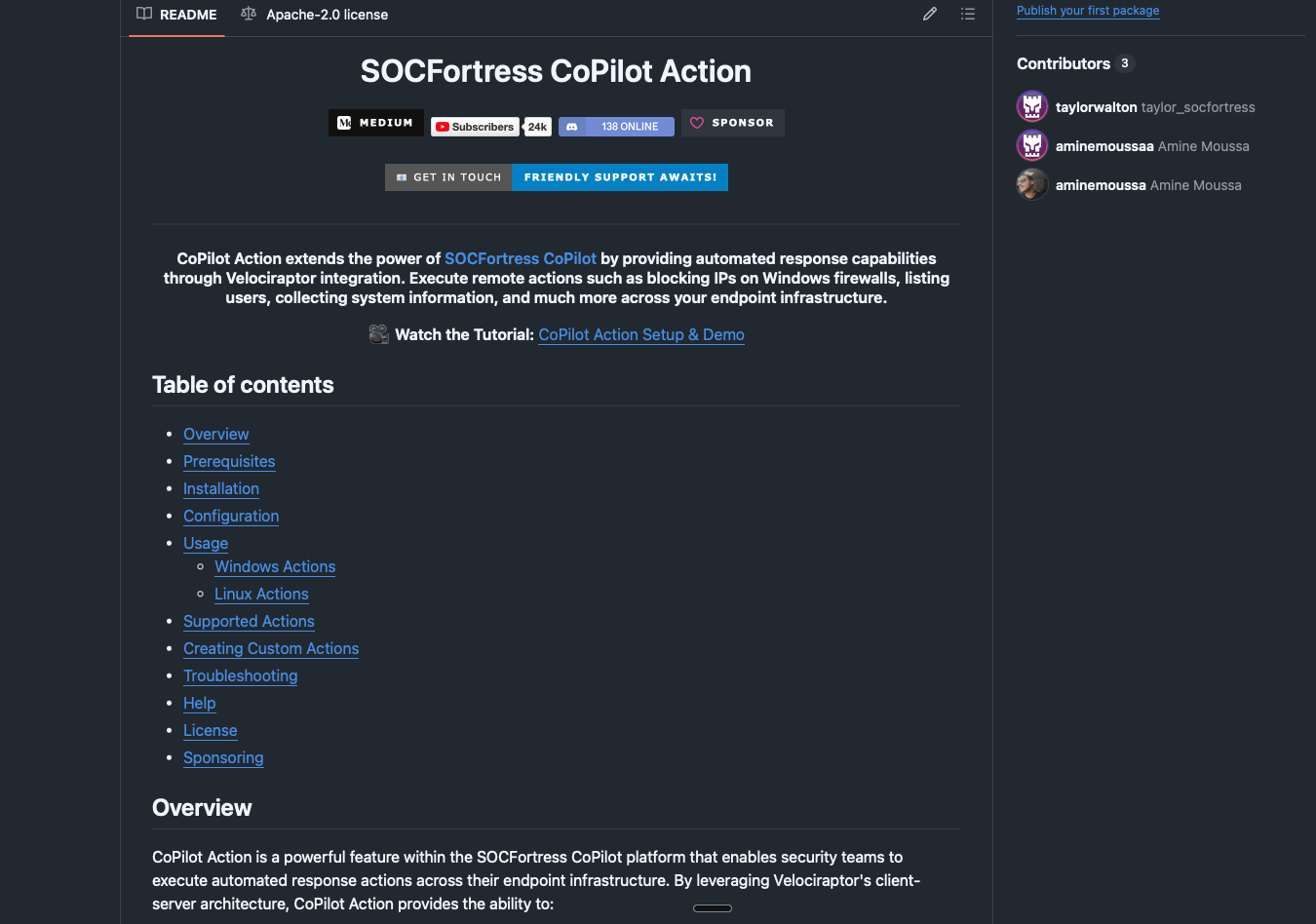
Repo (required for setup assets + implementation details):
* [https://github.com/socfortress/CoPilot-Action](https://github.com/socfortress/CoPilot-Action)
***
## Why this exists (vs “traditional Wazuh Active Response”)
Wazuh Active Response is powerful, but at scale it can become cumbersome to:
* deploy scripts to endpoints
* keep action logic consistent across OSes
* manage parameters and rollouts cleanly
CoPilot Actions is designed to make automated responses **simpler to run and easier to operationalize**.
***
## How it works
Conceptually:
1. You choose an action in CoPilot
2. CoPilot invokes a **Velociraptor artifact** (Windows or Linux)
3. The artifact downloads/executes the **action script** for the selected action
4. Results are written to logs and ingested into the stack
5. Grafana dashboards let you explore outcomes over time
CoPilot’s own UI also shows:
* supported OS/technology
* action metadata + description
* a link to the underlying source code repo for the action
 ***
## Prerequisites
* CoPilot is deployed and you can access **Agents → CoPilot Actions**.
* Velociraptor server + clients are deployed (the CoPilot-Action repo recommends Velociraptor **0.74.1+**).
* CoPilot can authenticate to Velociraptor (Connector configured).
***
## Setup checklist (recommended)
This is the practical “get it working end-to-end” checklist.
### 1) Import the required Velociraptor artifacts
From the repo:
* `velociraptor/Linux.Execute.RemoteBashScript.yaml`
* `velociraptor/Windows.Execute.RemotePowerShellScript.yaml`
Import them into Velociraptor (UI):
* **View Artifacts → Upload Artifacts**
Why: these artifacts are the execution layer that downloads and runs action scripts consistently.
### 2) Confirm the CoPilot ↔ Velociraptor connector
In CoPilot, configure and test the Velociraptor connector:
* **Connectors → Velociraptor**
Why: CoPilot needs API access to launch the artifact executions.
### 3) Ensure endpoints can download action scripts
CoPilot Actions commonly downloads scripts from public GitHub repos.
Verify:
* endpoints have egress to `raw.githubusercontent.com` (or wherever your scripts live)
* DNS + TLS inspection/proxy rules won’t block downloads
### 4) (Windows) Verify PowerShell can run scripts
If a Windows action relies on PowerShell, validate the execution policy and permissions on target endpoints.
(Example from the repo docs: `RemoteSigned` at `LocalMachine` scope.)
### 5) Create SIEM routing for action output (Graylog)
Recommended pattern:
* Create a dedicated **Graylog index set** (e.g., `copilot_action`)
* Create a **Graylog stream** that routes CoPilot Action output to that index
Why: action output is operational/response telemetry—keep it searchable without polluting core security logs.
### 6) Add/verify Wazuh rule support for action output
Action output is typically written to active response logs that the Wazuh agent already ships.
Add/verify the supporting detection rules so the Wazuh manager can identify/classify “CoPilot Action” results.
### 7) Import Grafana dashboards (optional but recommended)
The CoPilot-Action repo includes dashboards under:
* `Grafana/`
Import them into Grafana and point the datasource at the CoPilot Action index.
Why: dashboards make it much easier to confirm actions are firing and to review results across time.
***
## Repo pointers
Everything you need to stand this up (artifacts + dashboards + docs) lives in:
* [https://github.com/socfortress/CoPilot-Action](https://github.com/socfortress/CoPilot-Action)
***
## Common tasks
### Find an action
Use search to filter actions by name/technology.
### Invoke an action
***
## Prerequisites
* CoPilot is deployed and you can access **Agents → CoPilot Actions**.
* Velociraptor server + clients are deployed (the CoPilot-Action repo recommends Velociraptor **0.74.1+**).
* CoPilot can authenticate to Velociraptor (Connector configured).
***
## Setup checklist (recommended)
This is the practical “get it working end-to-end” checklist.
### 1) Import the required Velociraptor artifacts
From the repo:
* `velociraptor/Linux.Execute.RemoteBashScript.yaml`
* `velociraptor/Windows.Execute.RemotePowerShellScript.yaml`
Import them into Velociraptor (UI):
* **View Artifacts → Upload Artifacts**
Why: these artifacts are the execution layer that downloads and runs action scripts consistently.
### 2) Confirm the CoPilot ↔ Velociraptor connector
In CoPilot, configure and test the Velociraptor connector:
* **Connectors → Velociraptor**
Why: CoPilot needs API access to launch the artifact executions.
### 3) Ensure endpoints can download action scripts
CoPilot Actions commonly downloads scripts from public GitHub repos.
Verify:
* endpoints have egress to `raw.githubusercontent.com` (or wherever your scripts live)
* DNS + TLS inspection/proxy rules won’t block downloads
### 4) (Windows) Verify PowerShell can run scripts
If a Windows action relies on PowerShell, validate the execution policy and permissions on target endpoints.
(Example from the repo docs: `RemoteSigned` at `LocalMachine` scope.)
### 5) Create SIEM routing for action output (Graylog)
Recommended pattern:
* Create a dedicated **Graylog index set** (e.g., `copilot_action`)
* Create a **Graylog stream** that routes CoPilot Action output to that index
Why: action output is operational/response telemetry—keep it searchable without polluting core security logs.
### 6) Add/verify Wazuh rule support for action output
Action output is typically written to active response logs that the Wazuh agent already ships.
Add/verify the supporting detection rules so the Wazuh manager can identify/classify “CoPilot Action” results.
### 7) Import Grafana dashboards (optional but recommended)
The CoPilot-Action repo includes dashboards under:
* `Grafana/`
Import them into Grafana and point the datasource at the CoPilot Action index.
Why: dashboards make it much easier to confirm actions are firing and to review results across time.
***
## Repo pointers
Everything you need to stand this up (artifacts + dashboards + docs) lives in:
* [https://github.com/socfortress/CoPilot-Action](https://github.com/socfortress/CoPilot-Action)
***
## Common tasks
### Find an action
Use search to filter actions by name/technology.
### Invoke an action
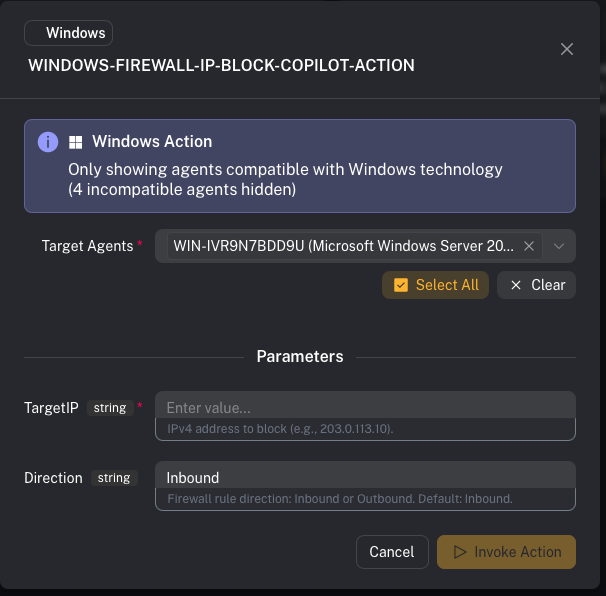 Typical flow:
1. Select an action
2. Review metadata (OS support, parameters)
3. Select a target agent
4. Invoke
Examples shown in the video:
* collecting browser history
* blocking an IP address via Windows Firewall
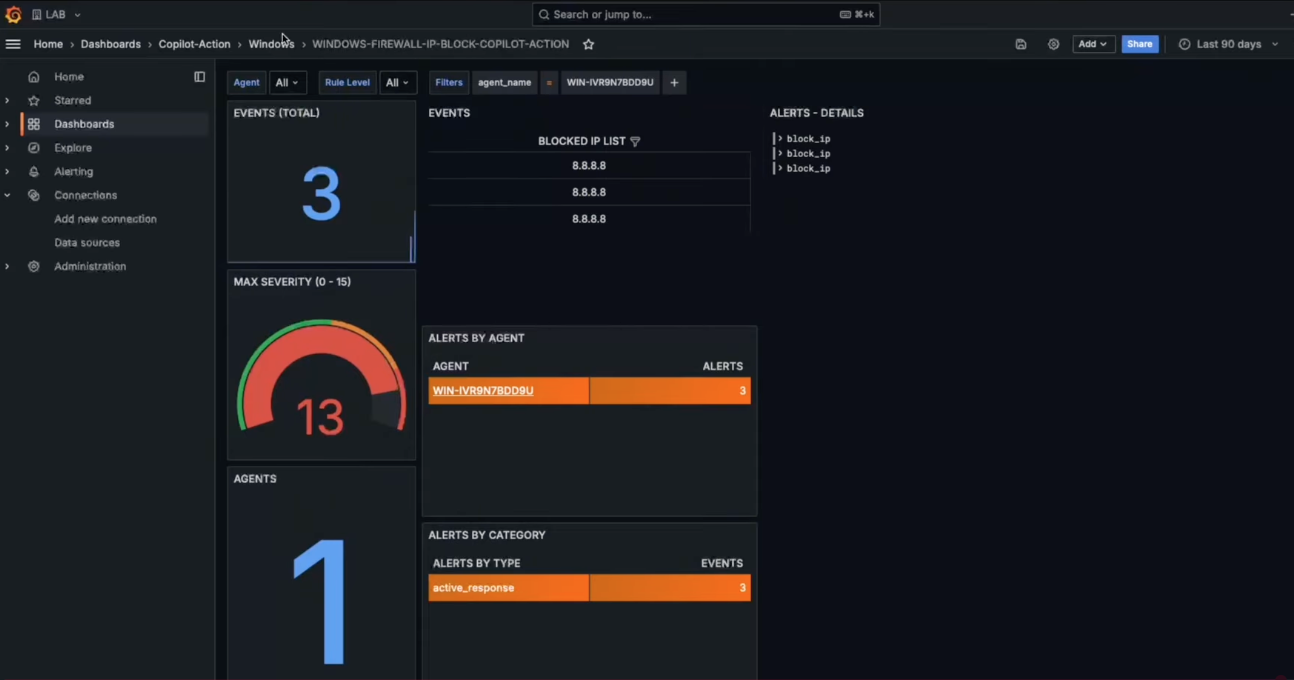
### View results
Results can be viewed:
* in Grafana dashboards (recommended for trending/overview)
* in Velociraptor execution logs/results (best for deep troubleshooting)
Typical flow:
1. Select an action
2. Review metadata (OS support, parameters)
3. Select a target agent
4. Invoke
Examples shown in the video:
* collecting browser history
* blocking an IP address via Windows Firewall
### View results
Results can be viewed:
* in Grafana dashboards (recommended for trending/overview)
* in Velociraptor execution logs/results (best for deep troubleshooting)
 ***
## Troubleshooting (fast checks)
If an action fails:
* Confirm the required Velociraptor artifacts exist and are runnable
* Check the Velociraptor artifact execution **logs/results** for errors
* Verify Graylog stream/index routing if you expect results in dashboards
* Confirm endpoint prerequisites (PowerShell availability, script paths, permissions)
***
## Gotchas
* Actions can be disruptive (containment/firewall changes). Use approvals + logging.
* Start by testing actions on a lab endpoint and then roll out.
* Ensure your routing keeps action output separated from core security telemetry.
***
## Video context
Feature walkthrough + setup approach:
* [https://www.youtube.com/watch?v=l9OLtgemYOQ](https://www.youtube.com/watch?v=l9OLtgemYOQ)
***
## Troubleshooting (fast checks)
If an action fails:
* Confirm the required Velociraptor artifacts exist and are runnable
* Check the Velociraptor artifact execution **logs/results** for errors
* Verify Graylog stream/index routing if you expect results in dashboards
* Confirm endpoint prerequisites (PowerShell availability, script paths, permissions)
***
## Gotchas
* Actions can be disruptive (containment/firewall changes). Use approvals + logging.
* Start by testing actions on a lab endpoint and then roll out.
* Ensure your routing keeps action output separated from core security telemetry.
***
## Video context
Feature walkthrough + setup approach:
* [https://www.youtube.com/watch?v=l9OLtgemYOQ](https://www.youtube.com/watch?v=l9OLtgemYOQ)