> ## Documentation Index
> Fetch the complete documentation index at: https://docs.socfortress.co/llms.txt
> Use this file to discover all available pages before exploring further.
# MITRE ATT&CK integration
> Technique-centric investigation and coverage lens powered by MITRE technique enrichment in Wazuh rules.
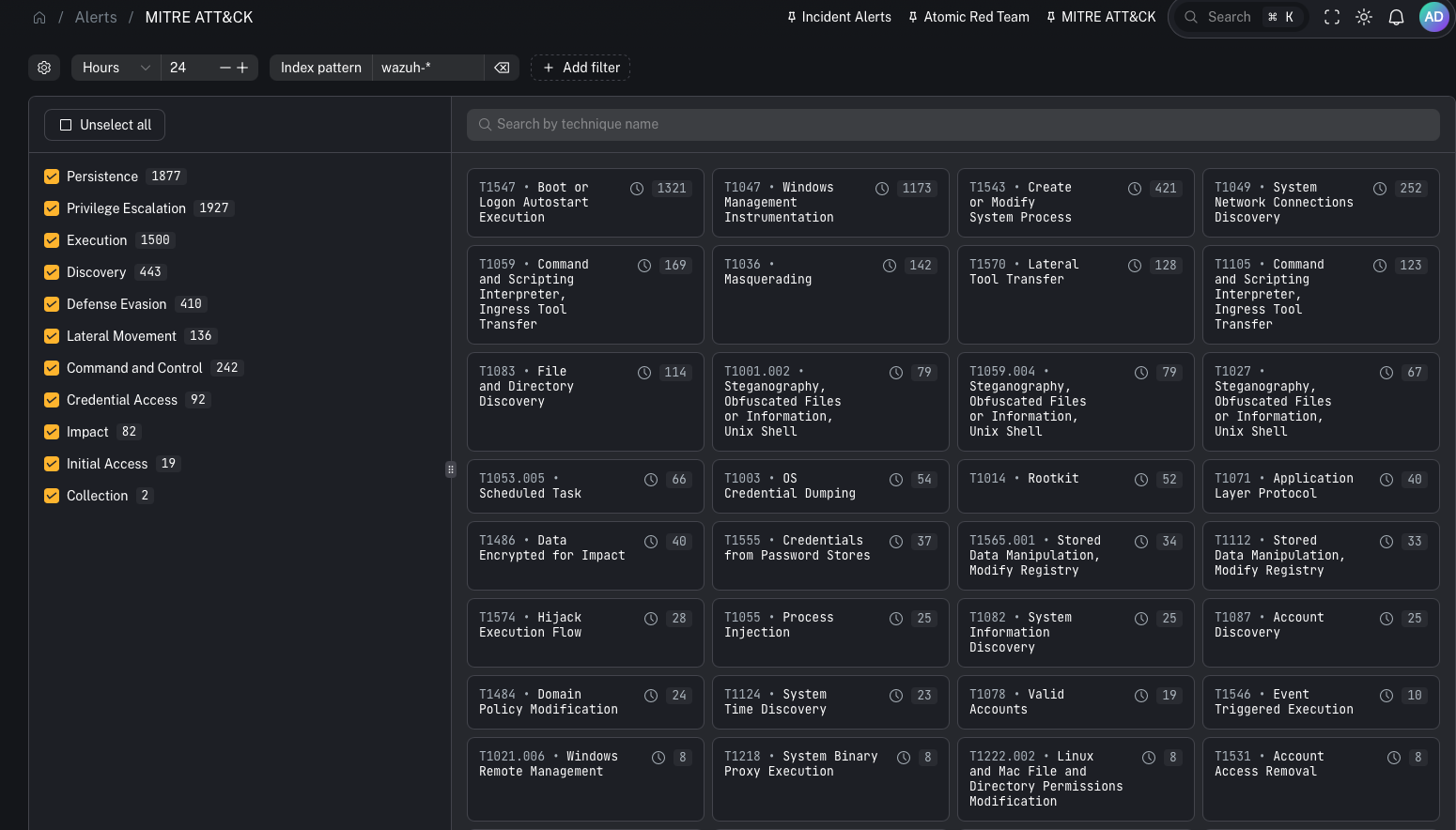
MITRE ATT\&CK in CoPilot gives you a technique-centric lens across alerts/events. It’s useful for:
* coverage conversations (“what do we detect?”)
* investigation context (“what does this behavior usually mean?”)
* mapping detections to a globally recognized adversary behavior framework
 ***
## What it is
MITRE ATT\&CK is a widely used framework that maps adversary behavior from **initial access** through **execution, persistence, lateral movement, and exfiltration**.
In CoPilot, the MITRE ATT\&CK view is built from **MITRE technique IDs attached to Wazuh rules**.
Key idea:
* When a Wazuh rule fires and includes MITRE technique metadata, CoPilot can display that technique and group related events under it.
***
## Why this is a power feature
Most SIEM alert views are “alert-first.” MITRE ATT\&CK flips it to “behavior-first.”
This helps:
* leadership and customers understand coverage in a standardized language
* analysts quickly interpret what a detection is *trying* to tell them
* detection engineers spot gaps (tactics/techniques you never hit)
***
## How technique enrichment works (Wazuh)
Wazuh’s rule syntax supports attaching MITRE technique IDs to a rule.
That means:
* default Wazuh rules can provide technique mappings
* your custom rules can also include technique IDs
* SOCFortress rules can include technique IDs as part of your tuned ruleset
When those rules generate events, CoPilot can present them inside the MITRE ATT\&CK experience.
***
## What you can do in the UI
When you open a technique, CoPilot shows an overview page with:
* description
* references
* direct link out to the MITRE technique page
***
## What it is
MITRE ATT\&CK is a widely used framework that maps adversary behavior from **initial access** through **execution, persistence, lateral movement, and exfiltration**.
In CoPilot, the MITRE ATT\&CK view is built from **MITRE technique IDs attached to Wazuh rules**.
Key idea:
* When a Wazuh rule fires and includes MITRE technique metadata, CoPilot can display that technique and group related events under it.
***
## Why this is a power feature
Most SIEM alert views are “alert-first.” MITRE ATT\&CK flips it to “behavior-first.”
This helps:
* leadership and customers understand coverage in a standardized language
* analysts quickly interpret what a detection is *trying* to tell them
* detection engineers spot gaps (tactics/techniques you never hit)
***
## How technique enrichment works (Wazuh)
Wazuh’s rule syntax supports attaching MITRE technique IDs to a rule.
That means:
* default Wazuh rules can provide technique mappings
* your custom rules can also include technique IDs
* SOCFortress rules can include technique IDs as part of your tuned ruleset
When those rules generate events, CoPilot can present them inside the MITRE ATT\&CK experience.
***
## What you can do in the UI
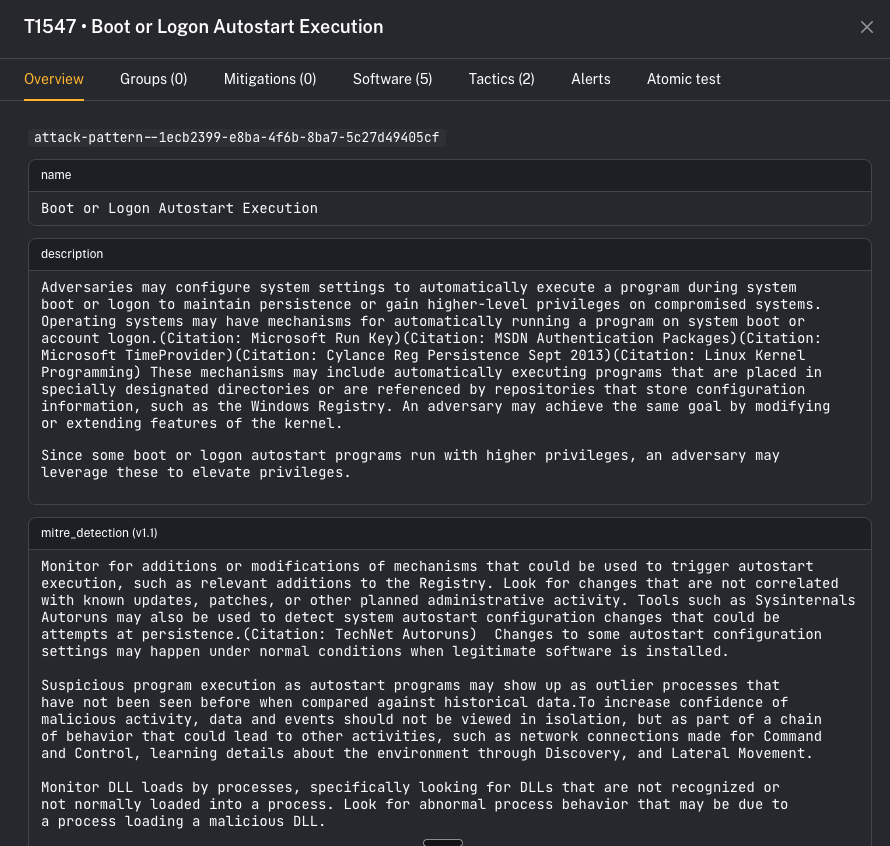
When you open a technique, CoPilot shows an overview page with:
* description
* references
* direct link out to the MITRE technique page
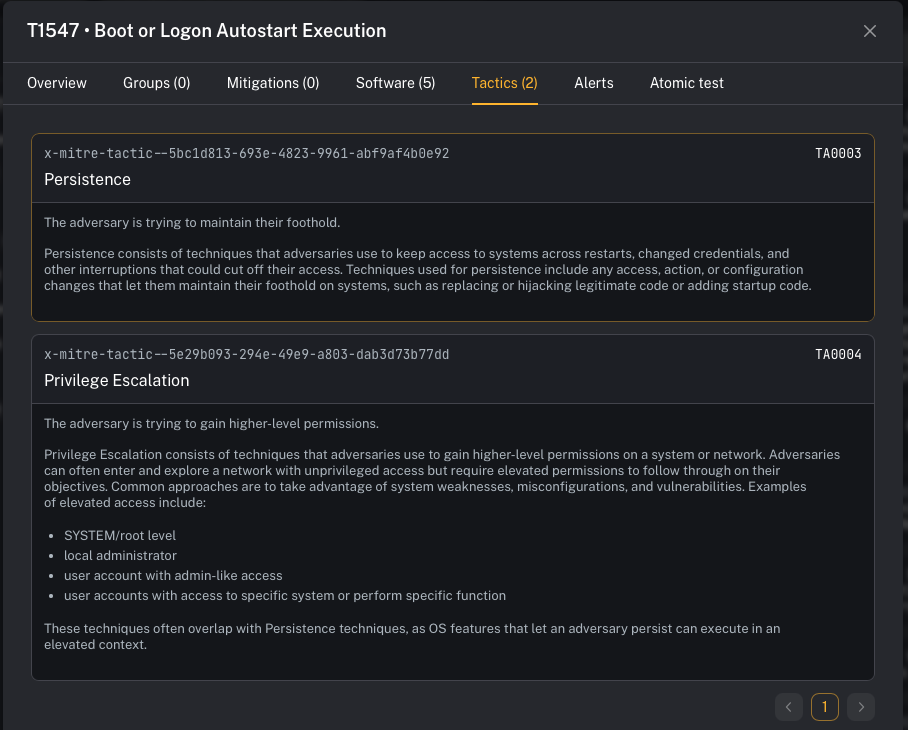 You can then pivot through supporting tabs such as:
* **Tactics** (the “why” / objectives)
* **Mitigations** (recommended controls)
* **Software** (tools/malware commonly associated)
* **Alerts / events** mapped to that technique
* **Atomic tests** (where available) to validate detections
You can then pivot through supporting tabs such as:
* **Tactics** (the “why” / objectives)
* **Mitigations** (recommended controls)
* **Software** (tools/malware commonly associated)
* **Alerts / events** mapped to that technique
* **Atomic tests** (where available) to validate detections
 ***
## Operator workflow (practical)
Use MITRE ATT\&CK when you want a fast interpretation loop:
1. Open **Alerts → MITRE ATT\&CK**
2. Pick a technique showing activity
3. Review tactics/mitigations/software context
4. Pivot into the linked alerts/events for the concrete evidence
5. If you’re testing, run an Atomic test to validate end-to-end detection coverage
***
## Prerequisites
* Wazuh detections are flowing into the stack
* Your Wazuh rules include MITRE technique IDs (default rules + your custom rules)
***
## Gotchas
* MITRE mapping quality depends on rule metadata. If a rule has no technique ID, it won’t show up here.
* This view is best for context and coverage—not necessarily the primary incident queue.
***
## Where to find it
* UI: [MITRE ATT\&CK (alerts view)](/user/ui/alerts-mitre)
***
## Video context
Walkthrough of the feature:
* [https://www.youtube.com/watch?v=wK4aA7QrXmE](https://www.youtube.com/watch?v=wK4aA7QrXmE)
***
## Operator workflow (practical)
Use MITRE ATT\&CK when you want a fast interpretation loop:
1. Open **Alerts → MITRE ATT\&CK**
2. Pick a technique showing activity
3. Review tactics/mitigations/software context
4. Pivot into the linked alerts/events for the concrete evidence
5. If you’re testing, run an Atomic test to validate end-to-end detection coverage
***
## Prerequisites
* Wazuh detections are flowing into the stack
* Your Wazuh rules include MITRE technique IDs (default rules + your custom rules)
***
## Gotchas
* MITRE mapping quality depends on rule metadata. If a rule has no technique ID, it won’t show up here.
* This view is best for context and coverage—not necessarily the primary incident queue.
***
## Where to find it
* UI: [MITRE ATT\&CK (alerts view)](/user/ui/alerts-mitre)
***
## Video context
Walkthrough of the feature:
* [https://www.youtube.com/watch?v=wK4aA7QrXmE](https://www.youtube.com/watch?v=wK4aA7QrXmE)